

25R3.0 Maintenance Notes
The items listed below were added in the 25R3.0 release cycle and contain maintenance items from the 25R3.0 release and future releases as they become available. Maintenance items in the Veeva application are corrections to existing functionality.
253.4.201 (April 1, 2026)
MyInsights
|
Platform |
Issue Description |
Issue Number |
|---|---|---|
|
Browser |
When users viewed MyInsights visualizations in sandbox environments, an error occurred when using composite API requests. |
CRM-347070 |
253.4.100 (February 26, 2026)
Account Management
|
Platform |
Issue Description |
Issue Number |
|---|---|---|
|
Browser |
When users in certain locales created a new account using the Parent Account Wizard, the latitude and longitude coordinates were not copied correctly from the parent address to the Data Change Request (DCR). This resulted in decimal points being removed or shifted, causing the geocodes to appear as excessively large integers in the downstream Network system. |
CRM-345257 |
|
iPad |
When users on iPad imported a new account via Network Account Search (NAS) and immediately attempted to submit a Data Change Request (DCR), the DCR notes window did not display and the request was not created. |
CRM-346027 |
Approved Email
|
Platform |
Issue Description |
Issue Number |
|---|---|---|
|
Browser, iPad |
Call pull-in fields were not populated when users created call reports from unassigned presentations. |
CRM-345250 CRM-344916 |
|
iPad |
When users viewed the Documented Interest section of a call report, the Expiration Date was not visible for those with read-only field permissions. |
CRM-344823 |
|
Browser |
When users presented media using CRM Desktop, default values for the Key Message reaction field were not reflected on the call report. |
CRM-345021 |
|
Browser |
When a Documented Interest record contained an oversized image within a rich text field, the Documented Interest related list on the call report did not correctly adjust to certain screen resolutions. |
CRM-345135 |
|
CRM Desktop (Windows) |
When users edited a call report launched from a Medical Event, an Account Not Found error message displayed even though the call was correctly associated with an attendee. |
CRM-345395 |
Call Reporting
|
Platform |
Issue Description |
Issue Number |
|---|---|---|
|
Browser, iPad |
Call pull-in fields were not populated when users created call reports from unassigned presentations. |
CRM-345250 CRM-344916 |
|
iPad |
When users viewed the Documented Interest section of a call report, the Expiration Date was not visible for those with read-only field permissions. |
CRM-344823 |
|
Browser |
When users presented media using CRM Desktop, default values for the Key Message reaction field were not reflected on the call report. |
CRM-345021 |
|
Browser |
When a Documented Interest record contained an oversized image within a rich text field, the Documented Interest related list on the call report did not correctly adjust to certain screen resolutions. |
CRM-345135 |
|
CRM Desktop (Windows) |
When users edited a call report launched from a Medical Event, an Account Not Found error message displayed even though the call was correctly associated with an attendee. |
CRM-345395 |
Call Sampling
|
Platform |
Issue Description |
Issue Number |
|---|---|---|
|
CRM Desktop (Windows) |
When users viewed a child call record from a Unique Activity group call, the sample status icon failed to display for attendees with an invalid license status. |
CRM-344820 |
CLM
|
Platform |
Issue Description |
Issue Number |
|---|---|---|
|
Browser |
When the Reference Document document type was inactive in a connected Vault instance, the CLM-Vault integration could not sync CLM content. |
CRM-345679 |
|
CRM Desktop (Windows) |
The My Presentations tab displayed when custom presentations were disabled. |
CRM-344578 |
|
Browser |
When using the Multichannel Loader, slides uploaded with spaces in the filenames resulted in key messages with CDN Path URLs containing %20. |
CRM-344674 |
|
Browser |
The CLM-Vault incremental sync failed when website key messages were deleted in Veeva CRM. |
CRM-345760 |
|
Browser |
Removing multiple users from content groups in one transaction incorrectly removed all users in that content group from the associated public group. |
CRM-345798 |
|
iPad |
Users were unable to zoom in correctly on image or PDF slides. |
CRM-345960 |
Engage
|
Platform |
Issue Description |
Issue Number |
|---|---|---|
|
CRM Desktop (Windows) |
Participant URLs were generated for user attendees. |
CRM-344850 |
Events Management
|
Platform |
Issue Description |
Issue Number |
|---|---|---|
|
iPad |
The warning text for event business rules displayed incorrectly. |
CRM-346078 |
|
Browser |
An error occurred when users with the English (Philippines) locale attempted to create a child event from an existing event with start time and end time populated. |
CRM-346079 |
Medical
|
Platform |
Issue Description |
Issue Number |
|---|---|---|
|
iPad |
When a user created a Documented Interest and selected a value from the Interest Category picklist, the field was populated with a value that did not match what was selected. |
CRM-345163 |
My Schedule
|
Platform |
Issue Description |
Issue Number |
|---|---|---|
|
iPad |
When a user changed the sorting of the account list to the hospital or location field, then navigated to a different screen, the list of accounts disappeared and displayed empty when the user returned to the scheduler view. |
CRM-344805 |
MyInsights
|
Platform |
Issue Description |
Issue Number |
|---|---|---|
|
iPad |
When a user accessed a report that redirected to an external page, the bottom portion of the content was vertically cropped and hidden behind the application's navigation bar. This forced the user to scroll to view the full content even though the external page could not detect the restricted visible area. |
CRM-345769 |
MyInsights Studio
|
Platform |
Issue Description |
Issue Number |
|---|---|---|
|
Browser |
When a user searched for an out-of-territory account and added it as a target on the Territory Feedback dashboard, a Metric Highlight Error displayed stating that a color value was invalid. The dashboard failed to render specific account details for the newly added target, resulting in error messages across the report metrics until the user exited and re-entered the feedback module. |
CRM-345123 |
Network Integration
|
Platform |
Issue Description |
Issue Number |
|---|---|---|
|
iPad |
When users performed a Network Account Search (NAS) and selected an account that had already been added to their territory, an error occurred when HCO records contained null values in the Group_Specialty_1_vod and Group_Specialty_2_vod fields. |
CRM-346068 |
|
iPad |
A sync error occurs when adding accounts from Network Account Search. |
CRM-346291 |
Order Management
|
Platform |
Issue Description |
Issue Number |
|---|---|---|
|
Browser |
When a user created an order with a detail-type product with multiple delivery rules for the same product brand associated with different price books of no priority level or the same priority level, the delivery period rule did not run and a conflict warning did not display. |
CRM-339332 |
Sample Management
|
Platform |
Issue Description |
Issue Number |
|---|---|---|
|
Browser |
When the SAMPLES_MGMT;;CONFIRM button label did not load from the Veeva Message cache, the Confirm button did not display on the My Samples page. |
CRM-345072 |
Suggestions
|
Platform |
Issue Description |
Issue Number |
|---|---|---|
|
iPad |
After actioning a suggestion from the suggestion detail page and returning to the detail page, the Dismiss and Mark as Complete buttons were still available. |
CRM-344818 |
253.0.800 (February 12, 2026)
User Visible and Behavior Changes (UVCs)
Events Management
|
Platform |
Description |
Before |
After |
|---|---|---|---|
|
Browser, CRM Desktop (Windows), iPad |
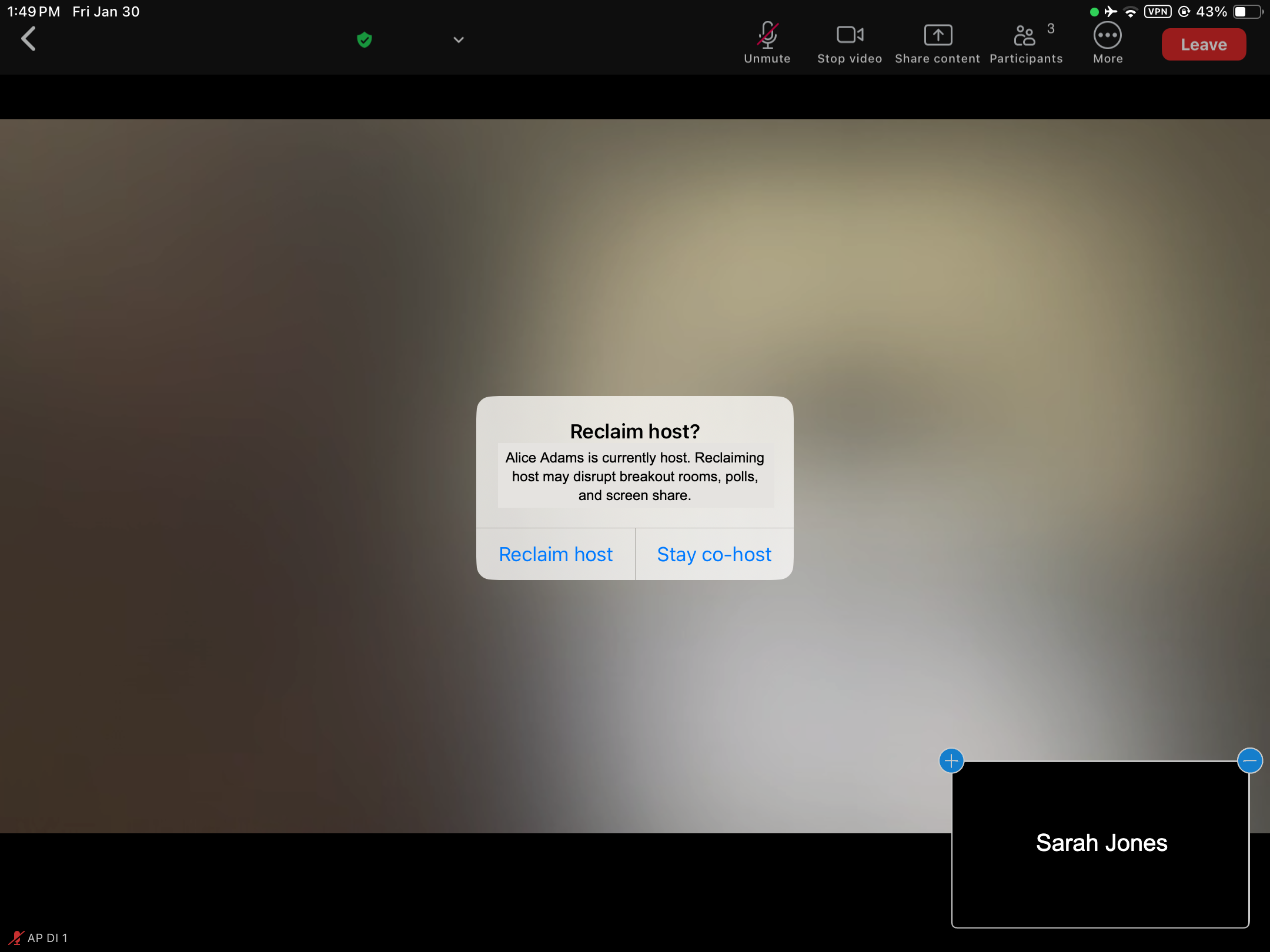
When an alternative host joins a virtual event that has already started, the Reclaim Host dialog displays. Select Reclaim host to become the host of the event, or select Stay co-host to continue with alternative host privileges. |
n/a |
|
|
iPad |
When an attendee joins a virtual event, they are associated with the current host. If that host leaves while the event is in progress, the attendee is also disconnected but can rejoin immediately. |
n/a |
n/a |
253.0.700 (February 5, 2026)
Account Management
|
Platform |
Issue Description |
Issue Number |
|---|---|---|
|
iPad |
When users selected the Go Online action to access Stakeholder Navigator, they were unable to create affiliations. |
CRM-345763 |
Approved Email
|
Platform |
Issue Description |
Issue Number |
|---|---|---|
|
Browser |
When users attempted to publish campaign activities containing more than 200 Campaign Job History records, the Approved Email process failed. |
CRM-345167 |
253.0.600 (January 22, 2026)
Events Management
|
Platform |
Issue Description |
Issue Number |
|---|---|---|
|
Browser, iPad |
When users with the English (Netherlands) locale created an event, the Start Time and End Time fields did not save correctly. |
CRM-345690 |
253.0.500 (January 15, 2026)
CLM
|
Platform |
Issue Description |
Issue Number |
|---|---|---|
|
CRM Desktop (Windows) |
When the Training field a Multichannel Activity record was not populated, an error occurred when users tried to share a web link for a CLM presentation. |
CRM-345380 CRM-345757 |
General
|
Platform |
Issue Description |
Issue Number |
|---|---|---|
|
iPad |
With Salesforce’s new policy about device authentication for SSO logins, Veeva’s legacy IP range (75.0.0.0 to 77.0.0.0) will be removed to mitigate users being prompted for device activation due to org-wide IP ranges. |
CRM-345654 |
253.0.400 (January 8, 2026)
Account Management
|
Platform |
Issue Description |
Issue Number |
|---|---|---|
|
Browser |
When viewing an account timeline, an error occurred when selecting the Previous 3 Months button. |
CRM-344141 |
Sync
|
Platform |
Issue Description |
Issue Number |
|---|---|---|
|
iPad |
An error occurred when adding an account to a territory via Global Account Search. |
CRM-345341 |
253.0.301 (December 18, 2025)
Approved Email
|
Platform |
Issue Description |
Issue Number |
|---|---|---|
|
iPad |
Users were unable to schedule emails to send after 11:00 AM UTC on December 31, 2025. |
CRM-345340 |
CLM
|
Platform |
Issue Description |
Issue Number |
|---|---|---|
|
CRM Desktop (Windows) |
Sometimes users were unable to sign into the Veeva CRM Desktop app. |
CRM-345291 |
253.0.300 (December 11, 2025)
Call Reporting
|
Platform |
Issue Description |
Issue Number |
|---|---|---|
|
Browser |
When a user's locale and language did not match, a datetime error occurred after adding a documented interest to a call and saving or submitting the call. |
CRM-344883 |
253.0.200 (December 4, 2025)
CLM
|
Platform |
Issue Description |
Issue Number |
|---|---|---|
|
CRM Desktop (Windows) |
An error occurred when sharing CLM content. |
CRM-344371 |
My Schedule
|
Platform |
Issue Description |
Issue Number |
|---|---|---|
|
Browser |
When navigating between the My Accounts, Events, and Lightning for My Schedule tabs, Lightning for My Schedule did not load correctly. |
CRM-344852 |
253.0.100 (November 20, 2025)
Approved Email
|
Platform |
Issue Description |
Issue Number |
|---|---|---|
|
Browser |
When the Approved Email process completed, the email notification confirming the job's status was intermittently not sent to administrators. |
CRM-343722 |
|
Browser |
When users sent Approved Emails to recipients with internationalized (non-ASCII) domain names, the application failed to create Email Activity records. |
CRM-343989 |
|
Browser |
Translations to Bulgarian were incorrect when using tokens in Zoom meeting invites. |
CRM-343852 |
Call Reporting
|
Platform |
Issue Description |
Issue Number |
|---|---|---|
|
Browser |
When users searched for child account attendees from the call report, search results displayed only the matching primary parent child account, rather than displaying all matching child accounts. |
CRM-338320, CRM-336081 |
CLM
|
Platform |
Issue Description |
Issue Number |
|---|---|---|
|
CRM Desktop (MacOS) |
After changing the language on the device, the Menu Bar displayed incorrectly. |
CRM-344673 |
Concur Sync
|
Platform |
Issue Description |
Issue Number |
|---|---|---|
|
Browser |
Sometimes Concur Sync succeeded, but the logs displayed Completed with Warnings incorrectly on the Concur Sync Administration tab. |
CRM-344461 |
Engage Connect
|
Platform |
Issue Description |
Issue Number |
|---|---|---|
|
Browser |
An error occurred when viewing the Engage Connect Process Administration tab for admins with certain locales. |
CRM-344570 |
Events Management
|
Platform |
Issue Description |
Issue Number |
|---|---|---|
|
Browser |
When a user attempted to edit and save an Expense Header record, an Invalid Data Error message occurred and blocked the record from saving. |
CRM-342922 |
|
Browser |
When an event speaker's utilization count exceeded 99, the system failed to update the speaker record. |
CRM-343825 |
General
|
Platform |
Issue Description |
Issue Number |
|---|---|---|
|
iPad |
The screen jumped when selecting a value for a picklist field. |
CRM-344655 |
|
Browser |
Single quotes in user input fields were not escaped. |
CRM-343157 |
Medical Inquiries
|
Platform |
Issue Description |
Issue Number |
|---|---|---|
|
Browser |
When a user created a Documented Interest, the Fulfillment Date displayed before saving was one day later than the date actually saved on the final record. |
CRM-340314 |
Microsoft Integration
|
Platform |
Issue Description |
Issue Number |
|---|---|---|
|
iPad |
Users were unable to add files from OneDrive as attachments to events. |
CRM-343959 |
Sync
|
Platform |
Issue Description |
Issue Number |
|---|---|---|
|
iPad |
When the Microsoft Outlook calendar is integrated with My Schedule, an error occurred when syncing with users who have access to over 200,000 external event records. |
CRM-343959 |
Territory Feedback
|
Platform |
Issue Description |
Issue Number |
|---|---|---|
|
iPad |
The Customer Test Total Targets and Customer Test Total Target Calls values in the Territory Feedback visualization were not immediately updated after editing goals for a target until the user navigated away and back to the visualization. |
CRM-334050 |
|
Browser |
When approving feedback for a top-level territory, the Approve or reject all pending challenges pop-up did not display when a child territory did not have any pending challenges |
CRM-336627 |

